Most conversations about WordPress customization focus on what it costs to do it. Fewer focus on what it costs not to.
Those framing matters, because the decision most small business owners actually face isn’t “should I invest in custom development?”, it’s “is what I have good enough?” And the answer to that question isn’t found in a price comparison. It’s found in the gap between what the current site is delivering and what it should be.
WordPress customization means building functionality, design, and integrations around how a specific business operates rather than accepting the constraints of whatever theme or plugin was closest to what the business needed. The case for it isn’t about features or aesthetics. It’s about whether a site is actively supporting the business or quietly working against it.
This article makes that case through the lens of cost, specifically, the costs that don’t appear on any invoice but show up in analytics, in customer behaviour, and in revenue that never materialises.
If understanding what professional WordPress customization actually covers would help frame the decision, that’s a useful place to start.
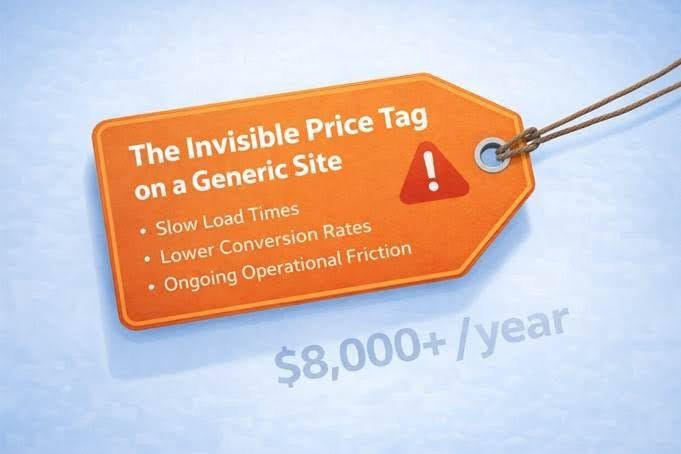
The Invisible Price Tag on a Generic Site
Every business that runs a WordPress site on an off-the-shelf theme with a stack of general-purpose plugins has made an implicit trade. Speed of setup and low upfront cost, in exchange for a site that does approximately what the business needs, not exactly.
That approximation carries a cost. It just rarely shows up as a line item.
The three categories where generic sites consistently underperform are speed, conversion, and operational drag.
On speed: a one-second delay in page load time reduces conversions by up to 7%, according to research cited across multiple performance studies, including analysis published by Crecso on custom WordPress ROI. For a site doing $10,000 a month in sales, that single second of slowness costs over $8,000 a year. The reason template-based sites are structurally slower is that they load every stylesheet, JavaScript library, and plugin asset regardless of whether that page uses them. A custom build loads only what each page actually needs.
On conversion: a site designed around a generic audience communicates differently than one built around a specific business’s actual customers. The layout assumptions, the call-to-action placement, and the content hierarchy are all built for the average case, not for the specific one. The conversion gap between a site that’s close enough and one that’s purpose-built is rarely dramatic on any single page visit. Accumulated across months of traffic, it’s significant.
On operational drag: every time a routine content update requires developer help because the CMS wasn’t built for how the business actually uses it, that’s time and money spent on something that should be frictionless. Every workaround, a third plugin to approximate a feature, a manual export to bridge two systems that should talk to each other, is operational friction that compounds quietly over time.
What “Custom” Actually Means in Practice
The word gets used broadly enough that it’s worth being specific. There are four distinct layers of WordPress customization, and they solve different problems.
Custom themes address the design and structural layer. A custom theme is built around a site’s specific layout requirements, brand identity, and content types. Unlike a purchased theme modified to fit, which carries dead code, unused layouts, and someone else’s assumptions about what the site should look like, a custom theme contains only what the site actually uses. This makes it faster, more maintainable, and genuinely unique. According to DevVerx’s analysis of custom theme development, only the CSS required for the site’s actual layouts gets loaded, with no dead code, and JavaScript is scoped to the components that need it — changes that directly improve Core Web Vitals performance without any optimization plugin compensating for structural bloat.
Custom plugins address the functional layer. When a business needs something to work in a specific way, a checkout with custom pricing logic, a membership system with tiered access rules, a booking flow that integrates with an external calendar, a custom plugin is the solution that doesn’t compromise. Custom plugins reside in their own directory and aren’t affected when WordPress core or other plugins update, meaning the specific business logic stays intact through updates.
Custom integrations address the connectivity layer. Most business operations involve more than a website. CRM, email platform, billing system, inventory, and booking software. When these tools don’t talk to the website, someone fills the gap manually. A custom API integration builds the connection to the actual data structure and workflows in play, rather than relying on a generic connector that handles the common case but not the specific one.
Backend customization addresses the management layer. WordPress is configurable at a deep level, with custom post types, custom fields, user roles, and editorial workflows. A site with a properly customized backend is one where the people managing it can do their jobs without worrying about breaking something or needing developer support for routine tasks.
Each layer solves a different category of problem. Most businesses don’t need all four simultaneously, which is also why custom development doesn’t have to mean an expensive from-scratch rebuild.
The SaaS Trap and What It Has to Do With WordPress
There’s a parallel worth drawing here, because it illuminates the customization decision in a way that pure WordPress discussion sometimes misses.
Many businesses start on SaaS website platforms Wix, Squarespace, Webflow, and Shopify because they’re fast, low-commitment, and require no technical setup. The trade-off, as Paid Memberships Pro’s comparison of WordPress versus SaaS documents clearly states, is that SaaS platforms offer superficial customization of colors, fonts, logo, but prevent deeper changes to layout or functionality unless explicitly allowed by the platform. The business doesn’t own its data or its infrastructure. Growth often means higher pricing tiers, platform lock-in, and limits that become apparent only after the business has already invested in building on that platform.
The same dynamic plays out within WordPress itself when a business stays permanently on generic themes and plugins. The platform is open and flexible, but if the site is never built around the business’s specific requirements, the practical result is similar to SaaS lock-in: a site that does approximately what the business needs, at the cost of the business adapting its processes to fit the tool rather than the tool fitting the business.
A professional education organization documented this clearly in a case study published by ESS ENN Associates: they had been running on SaaS LMS platforms. When their model required course bundling with physical merchandise, corporate group enrolments, SCORM compliance, and DRM-protected video in a single unified experience, every SaaS platform hit a wall. The custom WordPress LMS they commissioned eventually delivered a 62% reduction in customer acquisition cost and a gross margin improvement from 34% to 78% on digital course sales.
That’s not an argument that every business needs a comparable investment. It’s an argument that the right level of customization is determined by what the business actually requires, not by what’s cheapest at setup.
The Actual Costs, Itemised
To make this concrete, here’s what poor or absent WordPress customization costs across the five areas it shows up most consistently:
| Cost Area | What Happens Without Customization |
| Page speed | Generic themes load unused assets on every page. Sub-50 PageSpeed scores on mobile are common. Each additional second of load reduces conversions measurably. |
| Conversion rate | Generic layouts aren’t built around specific customer journeys. CTAs, form placement, and content hierarchy reflect average assumptions, not specific business goals. |
| Developer dependency | Sites not built for manageable editing require developer involvement for routine updates — adding cost and delay to every content change. |
| Integration gaps | Without custom API work, data moves manually between tools. Time spent on manual exports and duplicate data entry is a real operational cost, not just an inconvenience. |
| Security exposure | Each off-the-shelf plugin is a potential vulnerability. Sites running many plugins accumulate a larger attack surface than purpose-built sites. |
None of these costs requires a dramatic failure event to be real. They operate continuously, at low intensity, across every visitor session, every content update cycle, and every week. The site’s integrations don’t work the way the business needs them to. As WP Services’ analysis of hidden site costs notes, slow pages, broken features, and security gaps all represent direct revenue loss, not just technical problems.
A Self-Assessment
These questions surface where the real costs are accumulating:
| Question | Yes / No |
| Does the site’s mobile PageSpeed score consistently fall below 70? | |
| Are there manual data-transfer tasks that happen weekly because tools don’t integrate? | |
| Have content updates been delayed because they required developer involvement? | |
| Are three or more plugins being used together to approximate one clean workflow? | |
| Does the site’s design reflect how the business looks and communicates today? | |
| Are there features the business needs that no available plugin handles cleanly? |
Three or more “yes” answers suggest the current setup is carrying a meaningful hidden cost. The question isn’t whether customization is expensive; it’s whether the cost of not customizing is already higher.
What Good Customization Doesn’t Look Like
It’s worth addressing the misconception that customization means complexity, ongoing dependency, or a larger maintenance burden.
Done properly, it’s the opposite. A well-built custom plugin is simpler to maintain than three interconnected off-the-shelf plugins attempting to do the same job. A custom theme with clean, well-documented code is more stable under WordPress updates than a heavily modified commercial theme. A properly built backend means the team managing the site needs less developer support, not more.
The most common failure mode in custom WordPress development isn’t over-building, it’s under-specifying. A developer who builds to unclear requirements produces something that solves the immediate problem but doesn’t account for how the site will be used six months later. The result is technical debt that accumulates in the same way that plugin stacking does, just under a different name.
The safeguard against this is straightforward: customization should be scoped around specific, defined business requirements, not built speculatively. The conversation before any work starts should be about what the site needs to do, for whom, and how the team using it actually operates. Everything else follows from that.
FAQ
Is WordPress customization only for large or complex sites?
Not at all. Some of the highest-value customization work happens on small sites, a single custom plugin that automates a workflow that was previously done manually, or a theme that loads fast and converts well because it was built around the specific audience rather than a generic template. Scale doesn’t determine whether customization is warranted. The gap between what the site currently does and what it should do determines that.
How much does WordPress customization typically cost compared to staying with off-the-shelf solutions?
The upfront cost of custom work is higher than installing a plugin. The relevant comparison is total cost of ownership over time, which includes the revenue impact of a slower, lower-converting site, the time spent on manual workarounds, and the cost of developer firefighting when plugin conflicts break things. For businesses where the site is a meaningful revenue channel, the break-even on well-scoped customization is often shorter than expected.
Does custom development make a site harder to maintain?
When done well, no. Custom code built to WordPress standards, properly documented, and scoped to real requirements is easier to maintain than a site carrying the weight of many third-party plugins that interact in unpredictable ways. The maintenance burden increases when custom work is undocumented, not built to standards, or layered on top of an already complex setup rather than used to simplify it.
Can an existing site be customized without rebuilding everything?
In most cases, yes. Customization doesn’t have to be all-or-nothing. A specific plugin can be built to replace three approximate solutions. A theme can be rebuilt while the content and URL structure remain intact. An integration can be added without touching the rest of the site. The scope of any customization project should match the scope of the problem it’s solving, not be used as an excuse to replace things that are already working.
The decision to invest in WordPress customization is rarely about features or aesthetics. It’s about whether the gap between what a site currently does and what the business actually needs is costing more than the work required to close it.
For most businesses running sites that have grown them organically, theme from one source, plugins from several others, workflows that have accumulated rather than been designed, that gap is real, measurable, and worth taking seriously.
Understanding what WordPress customization services look like in practice is a practical starting point for figuring out where the highest-value work would be.